Point at anything. Get everything about it.
Hover to highlight, click to inspect. HTML, computed styles, the image or icon inside it, the video or font behind it — try it on the mock page below.
↑ parent · ↓ first child · ← → siblings · Esc to exit
Point at anything.
Get everything about it.
Every element, its assets, and the font behind it — read the docs.
main.header.a.mt-7
Esc to exit
DevTools tells you what an element is. WebPick gets it for you.
The Elements panel is thorough, and it's built for people debugging their own code. It won't hand you the highest-res version of an image, export an SVG icon buried in a sprite, pull the actual font file behind a heading, or grab the video stream behind a player. You'd stitch that together yourself, or dig through Network by hand.
WebPick does the digging. Click the toolbar icon (or Ctrl+Shift+U), hover, click — and whatever you clicked on is ready to copy or download, already in the format you'd actually use.
Everything it can tell you
Seven categories, all in the same panel.
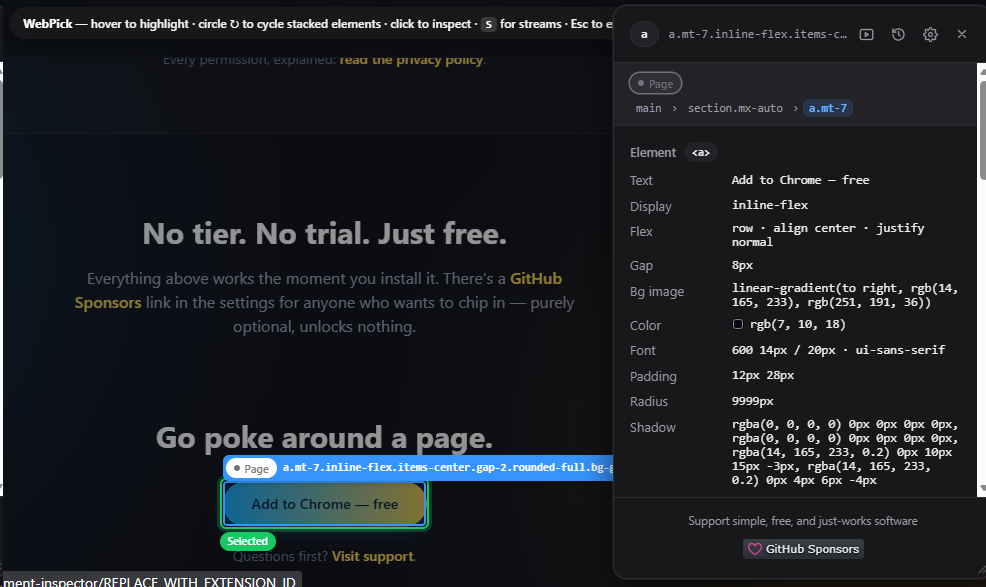
An actual screenshot — WebPick inspecting a button on an earlier version of this very page.
- Toggle from the toolbar icon or Ctrl+Shift+U (⌘+Shift+U on Mac). Esc exits.
- The page dims, the element under the cursor is highlighted, and a click opens it in the panel.
- Your clicks don't reach the page while inspecting, so pop-under ads, tracking links, and "click outside to close" menus don't fire.
- Keyboard moves you through the DOM: ↑ parent, ↓ first child, ← → siblings.
- Draw a small circle over a spot to step through what's layered there — an icon over a thumbnail, a caption over a video.
- Small wrappers around a single icon or image target the graphic itself.
- Every element is labelled by layer — Page, Modal, Popover, Toast, Overlay, Fixed, or iframe — and that layer outlines on the page.
- Works inside cross-origin and srcdoc iframes, and reaches into shadow DOM — selectors across shadow roots use the >>> notation.
Where does the data go? Nowhere.
WebPick has no backend of its own — nothing you inspect, save, or download is ever sent to us. Pick history lives on your device only, never synced. The panel is closed to the page it's inspecting, so the page can't read it or fake a click on it.
Every permission, explained: read the privacy policy.
No tier. No trial. Just free.
Every feature above works the moment you install it. There's a GitHub Sponsors link in the settings for anyone who wants to chip in — purely optional, unlocks nothing.
Go poke around a page.
Add to Chrome — freeQuestions first? Visit support.